Account security
Security Questions Security: Why They Fail and What to Use
Security questions security is broken at the concept level: the answers are biographical facts, not secrets. NIST SP 800-63B prohibited knowledge-based authentication in 2017, yet millions of accounts still rely on it. Here is what to do instead.
Your mother's maiden name is in a genealogy database. Your childhood street appears in seven years of social media posts. Security questions security is broken at the design level: knowledge-based authentication (KBA) asks you to prove identity using facts that were never actually private.
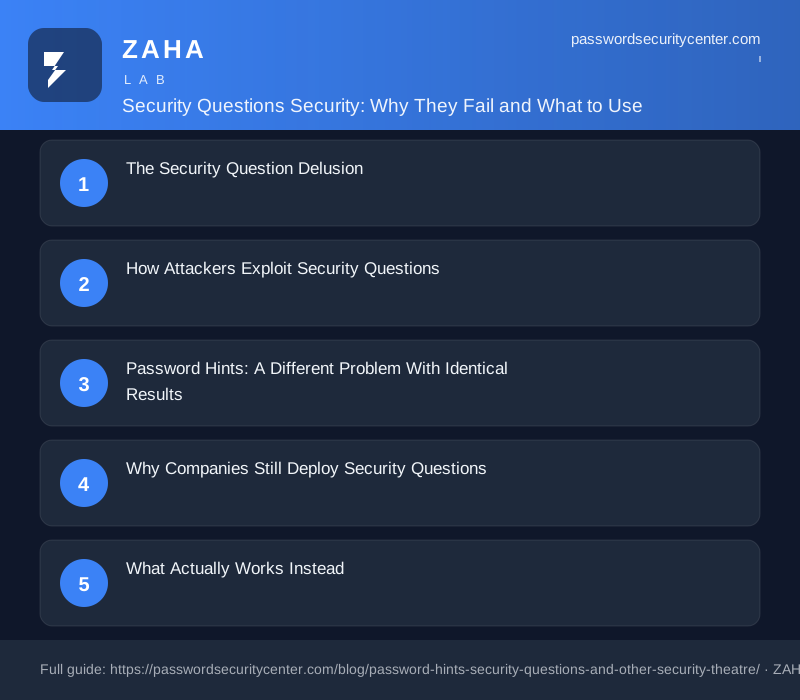
The Security Question Delusion
Security questions entered mainstream login flows in the 1990s as a way to let users recover forgotten passwords without calling a help desk. The logic seemed sound: only you would know your high school mascot or the street you grew up on. That logic collapsed the moment social media existed.
NIST SP 800-63B explicitly prohibits knowledge-based authentication for government digital services and warns against it for any relying party. The guidance is blunt: knowledge-based authentication is not permitted. Not discouraged. Not "use with caution." Prohibited.
The reason is structural. Security questions conflate a secret with a fact. A secret is something you chose to keep hidden. A fact is something true about you that other people might also know, find, or guess. Your first car, your favorite teacher, the city where your parents met: none of these are secrets. They are facts with moderate obscurity.
Obscurity is not security. It never was. If someone can Google their way to the answer, the answer was never a credential.
How Attackers Exploit Security Questions
The Verizon Data Breach Investigations Report consistently identifies social engineering and credential abuse as the top attack vectors in breaches. Knowledge-based authentication feeds both. An attacker who wants to reset your email account does not need to crack your password. They need to answer three questions about you, and LinkedIn, Facebook, and a data broker subscription give them a running start.
MITRE ATT&CK catalogs credential access via credential stuffing (T1110.003), but KBA attacks are often simpler: they are social engineering dressed as authentication. A patient attacker researches a target for 30 minutes and guesses answers with a hit rate that would register as a critical vulnerability in any other system.
The problem scales with public profile. A private individual with minimal social media presence carries moderate risk. A CEO, a politician, a journalist, or anyone with a Wikipedia page is substantially more exposed. Their mother's maiden name, birthplace, and first employer are documented facts, not secrets.
There is also the breach dimension. When a site storing your security question answers is compromised, those answers are often in plaintext or protected by weak hashing. Unlike a password, you cannot change your mother's maiden name. Once that answer is in a breach dump, it stays compromised indefinitely.
Password Hints: A Different Problem With Identical Results
Password hints predate security questions. Windows 95 offered them. The premise: write yourself a clue that only you will understand. The reality: people write clues that anyone who knows them will also understand.
A hint like "my dog's name" is one social media post away from being answered. A hint like "summer vacation 2003" is one Facebook memory away. Even abstract hints leak information: "the long one" tells an attacker the password is longer than average, "the blue one" narrows down a pattern, and "the first one I ever made" suggests something common and predictable.
The deeper problem is that hints stored server-side are stored data. Server-side stored data gets breached. If the hint closely describes the password, it is effectively the password itself sitting in a database waiting to be stolen.
Some systems store hints in plaintext alongside usernames. When a breach dumps that database, attackers receive a mapped list of usernames next to personalized password clues. This is the security equivalent of labeling your spare key "under the mat on the left."
Any hint strong enough to resist a breach is too cryptic to help you remember your password. Any hint weak enough to be useful is close enough to the password to be dangerous if the database is compromised.
Why Companies Still Deploy Security Questions
If NIST prohibited KBA years ago, why do banks, insurers, and government portals still ask for your high school mascot? The answer sits at the intersection of legacy architecture, outdated compliance frameworks, and risk transfer.
Legacy architecture is the most honest explanation. A system built in 2005 may have KBA baked into authentication flows that nobody has budgeted to replace. The cost of rearchitecting login for millions of customers is real and visible on a balance sheet. The cost of an occasional account takeover is diffuse and often absorbed by affected users rather than the platform.
Compliance is the subtler problem. Some audit frameworks still list KBA as an acceptable authentication factor, because those frameworks were written before the research on KBA failure rates accumulated. A security team that implements TOTP may receive the same audit pass as one that keeps KBA. The FTC's guidance on protecting personal information recommends multi-layered security, but the minimum requirement and the best practice are rarely the same line.
Risk transfer is the darkest explanation. If an account is taken over after the user "correctly" answered security questions, the company can argue the user failed to protect their answers. The liability shifts to the user. The company updates its incident log and moves on.
Healthcare and financial services are particularly visible here. These sectors face strict oversight but that oversight often specifies minimum controls rather than best practices. Passing the minimum audit and implementing genuinely strong authentication are two different things, and organizations under cost pressure consistently choose the former.
What Actually Works Instead
The alternatives to security questions are not experimental. They are widely deployed, well-documented, and in many cases free to implement.
Time-based one-time passwords (TOTP), specified in RFC 6238, generate a 6-digit code that expires in 30 seconds. An authenticator app stores the seed; the server stores only a hash. Even if the database is breached, the attacker cannot generate valid codes without the user's physical device. This is a structural improvement over KBA: the secret is ephemeral and device-bound, not a biographical fact that could be researched.
Hardware security keys (FIDO2/WebAuthn, standardized by the FIDO Alliance) go further. The private key never leaves the device. Phishing is structurally impossible because the key signs a challenge specific to the exact domain, so a fake login page receives a signature it cannot use on the real site. For high-value accounts, email, banking, domain registrar, password manager, a hardware key is the right tool.
Passkeys, also from the FIDO Alliance, bring the same cryptographic guarantee to a form factor most people already carry: their phone. A passkey replaces both the password and the second factor. There is no shared secret on the server side, because the server stores only the public key. Google, Apple, Microsoft, and GitHub all support passkeys as of 2024.
| Method | Phishing resistant | No shared secret | Recovery without KBA |
|---|---|---|---|
| Security questions | No | No | N/A |
| SMS OTP | No | No | Possible |
| TOTP (authenticator app) | Partial | Yes | With backup codes |
| Hardware key (FIDO2) | Yes | Yes | With backup key |
| Passkey | Yes | Yes | With platform recovery |
For account recovery specifically, the recommended pattern is: verify via a pre-registered backup email or phone number, require a hardware key, or for enterprise contexts use an identity provider with verified enrollment. None of these require you to remember which city your parents met in.
Migration Plan: Removing Security Theatre From Your Accounts
You do not need to fix every account in one afternoon. Prioritize by blast radius: which accounts, if compromised, cause the most downstream damage?
Start with email. Your email account is the recovery point for almost everything else. If an attacker resets your email, they can reset your bank, your password manager, and your social accounts. Remove security questions on your email provider, enable TOTP or a passkey, and store backup codes in your password manager.
Next, tackle financial accounts: banking, brokerage, payment services. Many still require KBA during initial setup but allow you to disable it after enrolling a second factor. If the interface buries this option, call customer support and ask explicitly how to remove knowledge-based authentication from your recovery flow.
For low-stakes accounts that only support security questions, use a password manager to generate and store random strings as answers. The question asks for your mother's maiden name; the answer is a 20-character random string that only your password manager knows. The security question becomes, effectively, a long random credential stored in a secure vault.
For any account with no path to removing KBA, document the random answers in your password manager under a dedicated note and treat those accounts as higher-risk by default. Never reuse KBA answers across sites: a breach at one site exposes the same answers everywhere you reused them.
What to do now:
- Open your email account settings today. Remove security questions. Enable TOTP or a passkey.
- Do the same for your password manager and primary bank.
- For any site that forces KBA, enter random strings as answers and save them in your password manager.
- Search Have I Been Pwned for your email address. If any breached sites stored security question answers, treat those answers as permanently compromised.
- Buy one FIDO2 hardware key for your highest-value accounts. Store a backup key in a different physical location.
Passkeys are supported by Google, Apple, Microsoft, GitHub, and hundreds of other services as of 2024. They eliminate the password and the security question in one step. Check under account settings, typically labeled Security or Sign-in options.
Frequently asked questions
Are security questions ever acceptable for account recovery?
No. NIST SP 800-63B prohibits knowledge-based authentication. For any site that forces KBA, generate random strings as answers and store them in a password manager rather than using real personal information.
What should I use instead of security questions?
TOTP authenticator apps (RFC 6238), hardware security keys (FIDO2), or passkeys. All three remove the reliance on personal facts that could be researched, guessed, or found in a data breach dump.
Can I just give fake answers to security questions?
Yes, and it is the recommended workaround for sites that force KBA. Generate a random string for each question, save it in your password manager, and never reuse answers across sites.
Why do banks still use security questions if NIST prohibited them?
Legacy systems, audit frameworks that predate the prohibition, and the ability to shift liability to users when accounts are compromised. The business incentive to remove KBA is weaker than the technical case against it.
Sources
- NIST SP 800-63B (Digital Identity Guidelines, authentication)
- FIDO Alliance: passkeys
- Verizon Data Breach Investigations Report
Related reading
Passkeys vs Passwords: What Actually Changes for You
A plain-English guide to passkeys vs passwords: how the key pair works, why phishing fails, what to do if you lose your device, and how to start migra

Two-Factor Authentication Setup: Right Order, Right Method
Set up two factor authentication correctly: secure email first, choose TOTP over SMS, store recovery codes safely, and follow the passkey upgrade path
Save Passwords in Browser: Safe or Risky?
Saving passwords in your browser is convenient—but is it actually safe? We break down how browser password storage works and where it fails.