Guides
What to Do After a Data Breach: A Timed Response Checklist
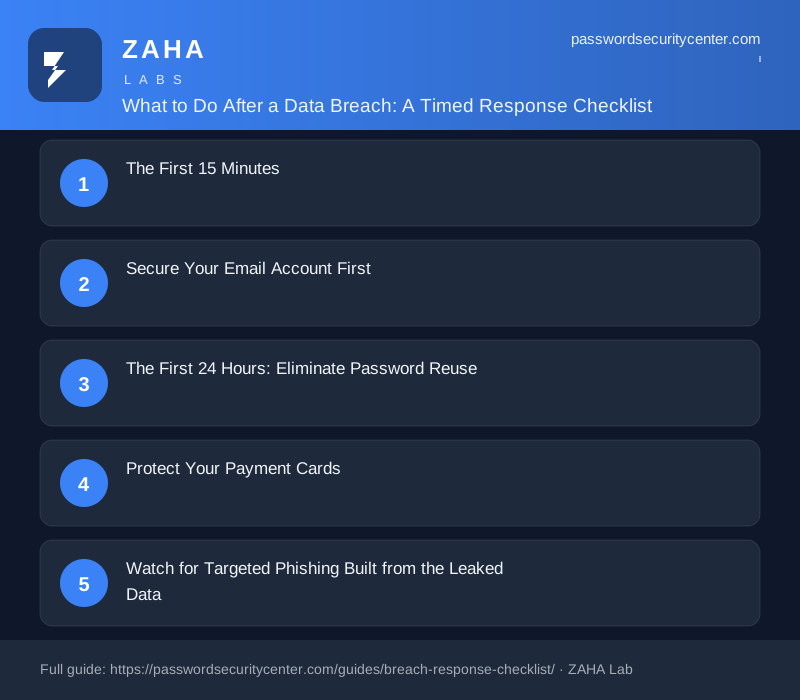
After a data breach, immediately change the exposed password and log out all active sessions on the breached service. Then secure your email account, eliminate password reuse across every other site, alert your bank if payment data was included, and freeze your credit if identity documents were leaked.

Most people reuse passwords across multiple accounts, so one breached service can unlock your bank, your email, and everything linked to both.
What to do after a data breach: Change the exposed password immediately and log out all active sessions on the breached service. Then secure your email account, eliminate password reuse across other sites, alert your bank if payment data was involved, and freeze your credit if identity documents were leaked. Every step below is sequenced by urgency.
The First 15 Minutes
You do not need to know the full scope of the breach to act. The first actions are the same regardless.
Change the Exposed Password Right Now
Log into the breached service (if it is still accessible), navigate to security settings, and change your password to something long and unique, at least 15 characters with no recognizable patterns. NIST SP 800-63B recommends prioritizing length over complexity; a random 20-character passphrase beats a short symbol-heavy string. If the service offers a "log out all other sessions" option, use it immediately, this terminates any attacker already logged in with your stolen credentials.
Check Whether Passwords Were Stored in Plaintext
Breach notifications rarely specify whether passwords were hashed or stored in cleartext. Assume the worst. Even if the notification says passwords were hashed, poor implementations, MD5 or SHA-1 without salting, can be reversed quickly against common passwords using precomputed lookup tables. Treat the password as fully exposed regardless.
Verify the Notification Is Real
Phishing emails impersonating breach notifications are common. Attackers send fake "your account was compromised" messages within hours of a real breach making headlines, knowing victims are anxious and will click. Open the company's official website directly in your browser; do not click any link in the notification email to reach the password reset page.
Go directly to the company's site in a new browser tab and initiate the password change from there. Attackers time fake breach notifications to arrive precisely when you're expecting a real one.
Secure Your Email Account First
Your email inbox is the master key to your digital life, every "forgot my password" reset flow lands there. An attacker with access to your inbox can reset any new password you set elsewhere, making all other steps temporary.
Change your email password now if the breached service and your email account share the same password or any close variation. Then enable two-step verification. App-based one-time codes using TOTP, the open standard defined in RFC 6238, are significantly harder to intercept than SMS codes. A hardware security key or a passkey, as specified by the FIDO Alliance, offers stronger protection still.
Also review your email account's connected apps and mail-forwarding rules. An attacker who briefly accessed your inbox may have silently configured forwarding to an external address, so they continue receiving your messages after you've changed your password.
The First 24 Hours: Eliminate Password Reuse
Credential stuffing, automatically testing breached username and password pairs against hundreds of other websites, is among the most predictable attacks that follow a public breach. MITRE ATT&CK documents it as T1110.003. It requires almost no skill from the attacker; the stolen credentials do the work.
Find Every Account Sharing the Password
Work through your password manager, or systematically recall accounts created around the same period as the breached service. Change the password on every account that shares the same or a similar credential. Start with the highest-value targets: banking, secondary email addresses, cloud storage, and workplace logins.
Check Whether Your Credentials Appear in Other Breaches
Have I Been Pwned's Pwned Passwords lets you check any password against hundreds of millions of exposed credentials. It uses a k-anonymity model so your actual password string is never transmitted to the site. If your password appears, retire it everywhere, not just on the breached service.
Start Using a Password Manager If You Don't Already
A password manager makes it practical to hold a different, randomly generated password for every service, the structural defense against credential stuffing. Both CISA and NCSC recommend them explicitly.
| Priority | Account type | Action |
|---|---|---|
| Immediate | Email accounts | New password + strong 2FA |
| Immediate | Banking and investment | New password + notify bank |
| Same day | Other financial services | New unique password |
| Same day | Any account sharing the breach password | New unique password |
| This week | All remaining accounts with reused passwords | Unique password per service |
Protect Your Payment Cards
If the breach notification mentions payment card data, or the breached service stored cards for recurring billing, contact your issuer and request a new card number. You do not need to wait for fraudulent charges to appear; most issuers will reissue as a precautionary measure. Keep records of all dispute communications in case you need them later.
For debit cards, act faster than for credit cards. Debit fraud can drain your account directly, and your dispute window under the Electronic Fund Transfer Act is shorter than the protections available for credit cards. Monitor all card transactions daily for the following 30 days.
Watch for Targeted Phishing Built from the Leaked Data
Breaches often expose more than passwords, names, phone numbers, physical addresses, and purchase histories travel alongside email addresses. Attackers use this context to craft convincing spear-phishing: a fake shipping notification that references your actual recent order, or a call from "fraud prevention" that already knows your home address.
For two to four weeks after a breach, be more skeptical than usual of unsolicited contacts:
- Emails referencing your name or order details connected to the breached company
- SMS messages from your bank about suspicious account activity
- Phone calls asking you to confirm card numbers or passwords
If you receive a suspicious email, check the sender's full domain, not just the display name, and look for subtle variations like "amazon-security.com" instead of "amazon.com." Legitimate fraud teams will not ask for your full card number or current password by any channel. Hang up and call the number printed on the back of your card.
Freeze Your Credit If Identity Data Was Exposed
A credit freeze instructs the credit bureaus not to release your credit file to new lenders, which blocks attackers from opening new accounts in your name. In the US it is free at all three major bureaus (Equifax, Experian, TransUnion), does not affect your existing accounts or credit score, and can be lifted temporarily when you legitimately apply for credit.
Apply a freeze if the breach involved any of the following: Social Security number, date of birth, government-issued ID number, or full name combined with address. A freeze is more effective than a fraud alert because a fraud alert only asks lenders to take extra verification steps, it does not block the inquiry itself.
What NOT to Do
Don't wait for the full picture. Breach investigations take weeks. The first steps are the same regardless of scope, so act now.
Don't replace the old password with something similar. Attackers who find "Summer2023!" will automatically try "Summer2024!", "Summer2023#", and common variations. Use a randomly generated password with no relationship to the old one.
Don't assume safety because you haven't seen fraudulent charges yet. The Verizon DBIR consistently finds that detection lags well behind initial compromise. Stolen credentials are often held, traded, or tested months before any visible impact.
Don't publicly confirm which account was yours or what data it contained. Posting on forums or social media that a specific breached account belongs to you, or confirming it held a home address or payment card, gives attackers verification they may not already have.
Don't reuse your new password anywhere else. The only durable defense against the next breach is a unique credential on every service. That is precisely what a password manager exists to make possible.
Frequently asked questions
How do I find out if my email address was included in a data breach?
Search your email address at Have I Been Pwned (haveibeenpwned.com), it checks against a database of hundreds of known breaches and shows exactly which ones included your address. You can also enable free alerts to be notified automatically when your email appears in a newly indexed breach.
Should I close my account on the breached site?
Closing an account does not erase data the company already holds, that depends on their retention policy. Changing your password and adding strong 2FA is usually the more practical step; close the account only if you no longer need the service.
Does changing my password stop attackers who already downloaded the breach data?
Changing your password stops future logins to the breached site, but it does not affect copies of your credentials that have already been downloaded or sold. The real ongoing risk is credential stuffing against other sites, which is why eliminating password reuse everywhere is the critical follow-up step.
How long should I monitor my accounts after a data breach?
Monitor financial accounts daily for at least 30 days. For identity data like Social Security numbers or dates of birth, the risk window is much longer, a credit freeze is more reliable than ongoing vigilance alone for preventing new account fraud over months or years.
Is receiving an SMS code good enough as a second authentication factor?
SMS codes are better than a password alone but are vulnerable to SIM-swap attacks, where an attacker convinces your carrier to redirect your number to a SIM they control. An authenticator app using TOTP (the standard defined in RFC 6238) or a passkey is significantly harder to intercept and is the recommended alternative.
What is the difference between a fraud alert and a credit freeze?
A fraud alert asks lenders to take extra steps before extending credit in your name, but it does not block the inquiry. A credit freeze prevents lenders from accessing your credit file at all, making it a much stronger barrier against new account fraud after identity data is exposed.
Sources
- NIST SP 800-63B (Digital Identity Guidelines, authentication)
- Have I Been Pwned: Pwned Passwords
- MITRE ATT&CK: brute force / credential stuffing
- Verizon Data Breach Investigations Report
Related reading
Passkeys vs Passwords: What Actually Changes for You
A plain-English guide to passkeys vs passwords: how the key pair works, why phishing fails, what to do if you lose your device, and how to start migra

Password Policy Best Practices That Staff Will Actually Follow
The proven password policy best practices: mandate length, ban reuse, deploy a manager with SSO, and enforce phishing-resistant 2FA for admins.