Guides
Password Manager Buying Guide: What Actually Matters
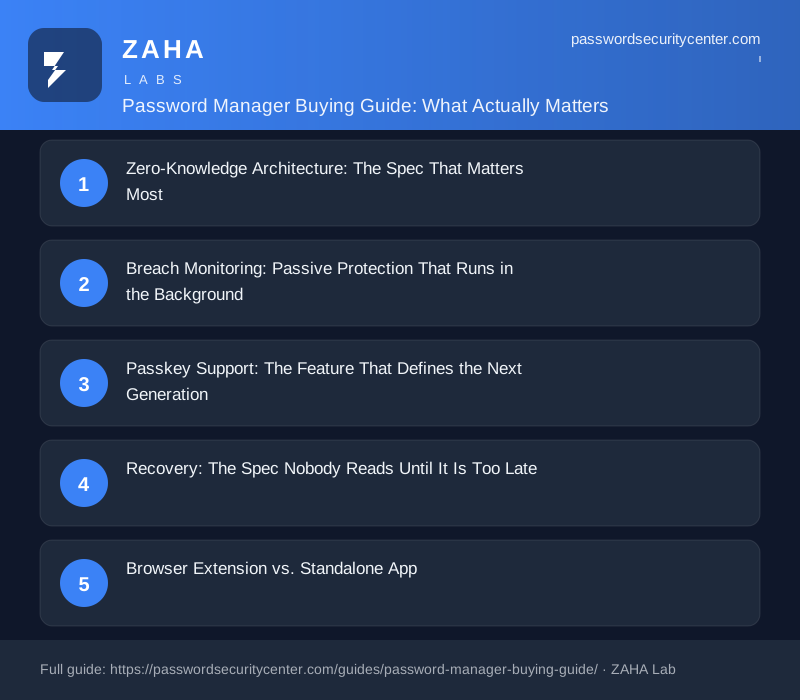
A password manager buying guide should start with one fact: the right tool generates and stores unique credentials behind a single master password you control, encrypting your vault locally before anything reaches the server. Zero-knowledge architecture, passkey support, and breach monitoring separate a trustworthy manager from a dangerous one. For solo users, a free tier from a well-audited provider is often all you need.
The Verizon Data Breach Investigations Report has ranked stolen credentials as the leading breach action for multiple consecutive years, not as a statistical curiosity but as the most efficient attack a criminal can run. This password manager buying guide covers what actually separates a trustworthy tool from a liability: zero-knowledge architecture, breach monitoring, passkey support, and a recovery plan you understand before you need it.
Zero-Knowledge Architecture: The Spec That Matters Most
What it means in practice
A zero-knowledge manager encrypts your vault on your device before anything is sent to the server. The provider stores an encrypted blob they cannot decrypt, if their infrastructure is breached, attackers get ciphertext, and without your master password and the key derived from it, that data is useless.
Look for AES-256 encryption combined with a modern key derivation function: PBKDF2, bcrypt, or Argon2. NIST SP 800-63B requires salted, iterated hashing for stored secrets, Argon2 is the current best choice because it is memory-hard, making large-scale brute-force expensive even with specialized hardware. Any product that cannot name its algorithm should be disqualified immediately.
What zero-knowledge does not protect
Zero-knowledge does not protect you from choosing a weak master password, or from malware that reads clipboard data after autofill. It also does not prevent the company from retaining metadata: login timestamps, IP addresses, and device identifiers. Know what threat model you are buying protection against before you assume the marketing covers it.
Breach Monitoring: Passive Protection That Runs in the Background
Every password manager worth considering integrates breach monitoring. The practical standard is the Have I Been Pwned Pwned Passwords API, which uses a k-anonymity model, only the first five characters of a hashed password are sent to the service, so your actual credential never leaves your device.
The feature that matters is automatic monitoring: the manager checks your stored credentials against new breach disclosures and alerts you without you having to request it. Credential stuffing attacks, where attackers systematically try breached username and password pairs across hundreds of sites, run continuously (MITRE ATT&CK T1110.003). Early warning before an attacker reaches your account is the entire value of this feature.
Passkey Support: The Feature That Defines the Next Generation
The FIDO Alliance defines passkeys as device-bound cryptographic credentials that replace passwords entirely for supported services. A good password manager now does two distinct things with passkeys: it stores passkeys you create on supported websites, and it acts as a passkey provider, generating and syncing passkeys across all your devices.
Passkey provider support is the harder capability to implement and the one that separates current-generation managers from tools quietly becoming legacy. Without it, passkeys are locked to a single device. Verify that a product supports the FIDO2/WebAuthn credential management APIs on every platform you use, Windows, macOS, iOS, and Android each expose slightly different interfaces, and coverage is inconsistent across products.
Even with passkeys and breach monitoring active, a weak master password undoes every other safeguard. NIST SP 800-63B prioritizes length over complexity, a 15-character passphrase is harder to crack than a short string of mixed symbols. Enable two-factor authentication (TOTP per RFC 6238 or a hardware security key) on the manager account itself, and treat it as non-negotiable.
Recovery: The Spec Nobody Reads Until It Is Too Late
Losing vault access is a genuine risk, and recovery mechanisms are where managers make engineering trade-offs that affect real users badly. The main options:
- Emergency access: Grant a trusted contact time-delayed entry. They request access; you have a configurable window, typically 24 to 72 hours, to deny it; if you do not respond, they gain access. This design balances usability with safety.
- Recovery codes: Single-use offline codes. Secure if stored correctly, but operationally fragile because most people lose them.
- Email-based recovery: Convenient, but potentially breaks zero-knowledge if the provider can reset your vault key via email alone. Ask explicitly how this path works before trusting it.
- No recovery: Some managers offer none by design, the master password is irreplaceable. Honest, but demands a rigorous personal backup strategy.
Before migrating your vault, answer this question: if you lose your master password and your backup codes tonight, what happens? Write down that answer and decide whether you can live with it.
Browser Extension vs. Standalone App
Browser-native managers, the built-in keychains in Chrome, Safari, Firefox, and Edge, are free and adequately generate and autofill passwords. Their weaknesses: cross-browser portability is poor, secure sharing is absent or limited, and breach monitoring and passkey provider support are inconsistent at best.
Standalone managers with browser extensions maintain a vault that exists independently of any browser. The extension handles autofill; the native app handles vault health audits, secure sharing, emergency access, and export. You can use it across every browser and device simultaneously.
The practical rule: if you use one browser on one device ecosystem and never need to share credentials with anyone, a browser-native manager may be sufficient. For everyone else, a standalone product is worth the small additional setup time.
| Feature | Browser-native | Standalone + extension |
|---|---|---|
| Cross-browser sync | Limited | Yes |
| Mobile app | Ecosystem only | iOS and Android |
| Breach monitoring | Rare | Standard on paid tiers |
| Passkey provider | Partial | Increasingly yes |
| Secure sharing | No | Yes (family/team plans) |
| Offline vault access | Yes | Product-dependent |
| Export / portability | Poor | CSV and encrypted export |
Price Traps and When Free Is Enough
Password manager pricing has converged on a tiered model: a free tier with device or sync restrictions, a personal paid tier, and family or team plans above that. Common traps to watch for:
Sync limit bait-and-switch: Some free tiers now restrict sync to a single device type, mobile only, or desktop only. Read the current terms before migrating a vault, as these limits change with little notice.
Paying for security fundamentals you already have: AES-256 encryption, zero-knowledge architecture, and basic breach alerts are standard on free tiers from major providers. Paid upgrades buy secure sharing, priority support, and advanced recovery options, not meaningfully stronger encryption.
Family plan math: If two or more people in a household need a manager, a family plan covering five to six users typically costs less than two individual subscriptions. Run the numbers before buying individual licenses.
Export before you commit: Before trusting any manager with hundreds of credentials, export a test vault and confirm you can read and import it elsewhere. The FTC's guidance on protecting personal information emphasizes maintaining control of your own data, the same principle applies to your credential store.
An honest note: for a single person using one browser, the free tier of any well-audited manager is functionally sufficient for security. Paid tiers primarily buy convenience, not protection.
Six Checks Before You Trust It
Run this checklist before migrating your vault to any product:
- Published security audit: Has a third party audited the application and released the results publicly? Look for the report itself, not just a claim that an audit occurred.
- Open-source client: An open-source client allows the community to verify that the encryption described in the marketing matches the actual code. The server can remain proprietary.
- Incident history and transparency: Has the company experienced a breach? More predictive than a clean record is how they responded, disclosure timeline, what was exposed, and what changed afterward.
- Full platform coverage: Confirm active support for every OS and browser you use today, including mobile.
- Export tested before migration: Export a test vault and import it into a second tool. This is your insurance against a vendor changing terms, being acquired, or shutting down.
- Recovery path understood completely: Know your full recovery chain before your first login, not after you have already lost access.
CISA recommends using a password manager as a foundational security practice. These six checks are how you verify the manager itself deserves that trust.
Frequently asked questions
Is it safe to store all my passwords in one place?
With a zero-knowledge manager using AES-256 and a strong master password, the risk of a vault breach is lower than the risk of reusing passwords across sites. The single point of failure is your master password, make it long, unique, and back it up offline.
What happens if the password manager company gets hacked?
With genuine zero-knowledge architecture, a server breach exposes only encrypted data. Without your master password, attackers cannot decrypt the vault. This is why verifying the encryption algorithm and key derivation method before trusting the marketing is essential.
Is a free password manager secure enough?
For most individuals, yes. Free tiers from major providers include AES-256 encryption and zero-knowledge architecture. Paid tiers add secure sharing, advanced recovery options, and priority support, not meaningfully stronger encryption.
Should I use my browser's built-in password manager?
It is better than reusing passwords, but browser-native managers typically lack cross-browser portability, reliable breach monitoring, passkey provider support, and secure sharing. For anyone using multiple browsers or devices, a standalone manager is the better choice.
What is the most important step when setting up a password manager?
Choose a master passphrase of at least 15 characters and immediately enable two-factor authentication on the manager account. Then document your complete recovery path, what you will do if you lose both your master password and your backup codes, before storing any credentials.
Do passkeys make a password manager unnecessary?
Not yet. Passkey adoption is growing but most services still require passwords, and a manager stores both. A manager that acts as a passkey provider future-proofs your setup while continuing to handle credentials for the sites that have not yet made the switch.
Sources
- NIST SP 800-63B (Digital Identity Guidelines, authentication)
- Have I Been Pwned: Pwned Passwords
- FIDO Alliance: passkeys
- Verizon Data Breach Investigations Report
Related reading

Passkeys vs Passwords: What Actually Changes for You
A plain-English guide to passkeys vs passwords: how the key pair works, why phishing fails, what to do if you lose your device, and how to start migra

Password Policy Best Practices That Staff Will Actually Follow
The proven password policy best practices: mandate length, ban reuse, deploy a manager with SSO, and enforce phishing-resistant 2FA for admins.

Two-Factor Authentication Setup: Right Order, Right Method
Set up two factor authentication correctly: secure email first, choose TOTP over SMS, store recovery codes safely, and follow the passkey upgrade path