Guides
Password Policy Best Practices That Staff Will Actually Follow
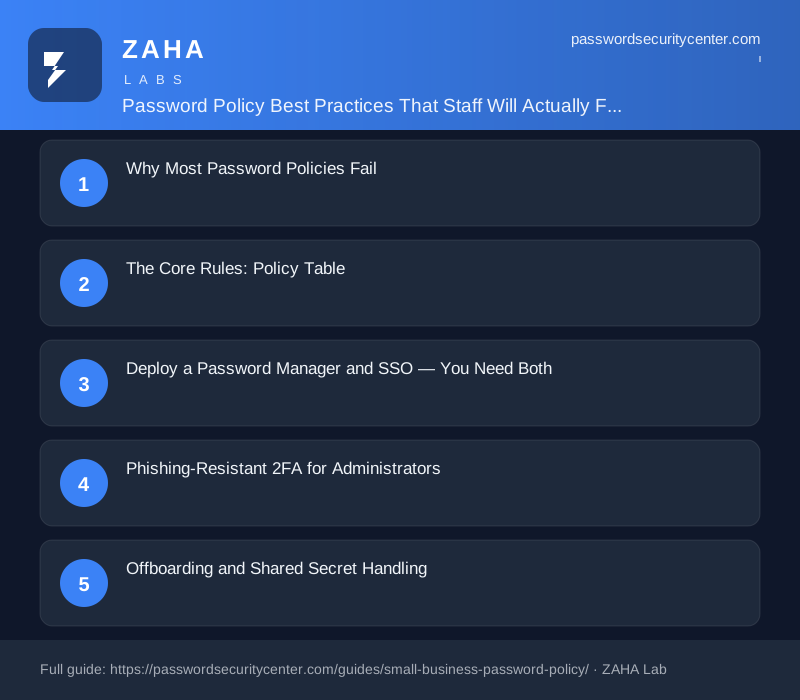
Password policy best practices, backed by NIST SP 800-63B and NCSC guidance, start by dropping two things most policies still enforce: forced rotation and complexity requirements. In their place, mandate a 15-character minimum, screen credentials against breach databases, deploy a password manager with SSO, and require phishing-resistant 2FA for administrators. These four controls are enforceable, auditable, and aligned with how attackers actually operate.

Over 80% of hacking-related breaches exploit stolen or weak credentials, according to the Verizon Data Breach Investigations Report. Yet most organizations still enforce 90-day rotation cycles and mandatory symbol requirements, measures that push staff toward predictable patterns rather than stronger passwords.
Password policy best practices, per NIST SP 800-63B and NCSC guidance, reduce to four enforceable mandates: require at least 15 characters, screen every password against known breach data, deploy a password manager alongside SSO, and enforce phishing-resistant 2FA for administrator accounts. Drop forced rotation and complexity rules, both are formally deprecated.
Why Most Password Policies Fail
Complexity rules ("must include uppercase, number, and symbol") produce passwords like Summer2024! or P@ssw0rd, technically compliant, trivially predictable. When paired with 90-day rotation, staff increment the season: Winter2025!. This pattern is not hypothetical; predictable incremental substitution is documented under credential-stuffing techniques in MITRE ATT&CK.
NIST SP 800-63B deprecated both mandatory complexity requirements and periodic rotation in 2017. NCSC reached the same conclusion independently. The shared reasoning: forcing frequent changes with character class requirements trains users to select patterns that are memorable to humans but equally memorable to attackers.
Length Beats Complexity
The primary driver of resistance to brute-force and stuffing attacks is entropy, and the fastest path to entropy is length. A 20-character passphrase built from four random words is far harder to crack than an 8-character string with mandatory symbols. NIST now recommends allowing passwords up to 64 characters and never setting a maximum below that threshold.
Length is also cognitively manageable. A phrase like correct-horse-battery-staple is strong and memorable without training. Complexity requirements, by contrast, push users toward shorter strings with predictable substitutions, a measurable net loss in security.
The Core Rules: Policy Table
The table below is the working core of your policy. Each row answers the question an auditor or skeptical employee will ask: why this rule, and how do we check it?
| Rule | Why | How to enforce |
|---|---|---|
| Minimum 15 characters; no maximum below 64 | Length is the primary entropy driver; NIST 800-63B §5.1.1 | Configure at IdP or application layer; verify during onboarding |
| No scheduled rotation unless compromise is confirmed | Forced rotation produces predictable increments | Remove rotation timers from Group Policy and IdP settings; rotate only on confirmed or suspected breach |
| Screen every password against known breach lists | Breached credentials appear in stuffing attacks immediately after a breach | Integrate the Have I Been Pwned Passwords API (k-anonymity model) at every password set or reset |
| One unique password per service | Reuse means one breach compromises every account | Mandate company-licensed password manager; review vault health reports monthly |
| No complexity rules beyond a minimum character set | Complexity requirements are met by predictable substitutions | Remove uppercase, number, and symbol mandates; rely on length and breach screening instead |
| Phishing-resistant 2FA for all admin accounts | Real-time phishing proxies can intercept TOTP codes within their 30-second validity window | Require FIDO2 passkeys or hardware security keys for every privileged account |
| Authenticator-app 2FA for all staff | Adds a second factor even when a password is compromised | Accept TOTP per RFC 6238; disable SMS OTP for all high-privilege accounts |
Shared credentials, a team social media login, a vendor portal, a shared admin account, sit outside your SSO governance and password manager policies. Document every shared secret in a restricted vault with named owners, and rotate them the same day any person with access leaves the organization.
Deploy a Password Manager and SSO, You Need Both
SSO and a password manager address different parts of the credential problem. SSO (via SAML or OIDC) routes authentication through your central identity provider, Okta, Microsoft Entra ID, Google Workspace, so downstream SaaS applications inherit the authenticated session. Revoke a user at the IdP and all connected apps close in the same action. That single-action deprovisioning is the primary offboarding win.
A password manager covers the long tail: legacy apps, vendor portals, shared utility accounts, and any service that does not support SSO. Provide company-licensed seats, set a master password minimum of 15 characters in the manager's admin console, and pull vault health reports monthly. These reports surface reused, weak, and breached credentials, the most actionable signals for your next remediation sprint.
Master Password Governance
The master password is the highest-privilege credential in each employee's environment. Apply the same 15-character floor. Do not store copies anywhere IT can retrieve them, the security model of a password manager depends on the employee being the sole holder. For account recovery, use the provider's built-in mechanism (emergency kit, recovery code stored offline) rather than IT-held copies, which create a parallel attack surface you cannot easily monitor.
Phishing-Resistant 2FA for Administrators
TOTP, time-based one-time passwords per RFC 6238, meaningfully reduces risk for general staff. For accounts with administrative access to your IdP, cloud infrastructure, or domain controllers, TOTP is not sufficient. Real-time adversary-in-the-middle proxies can forward a valid TOTP code to the legitimate service within the 30-second validity window. The user is phished; the code is accepted.
The answer is phishing-resistant authentication. FIDO2 passkeys and hardware security keys such as YubiKey or Google Titan bind authentication cryptographically to the correct origin domain. A lookalike site receives a response that is mathematically unusable without the real origin. The FIDO Alliance passkey standard is now supported natively on all major platforms and browsers.
Require every privileged account to have at least two registered hardware keys, one for daily use, one stored securely as a backup. Define a key-loss recovery procedure that does not fall back to SMS or email, since both channels are phishable. CISA recommends phishing-resistant MFA as the baseline for any account with elevated access.
Offboarding and Shared Secret Handling
Offboarding is where most policies fail in practice. Accounts deprovisioned "at the end of the process" may remain active for days after departure. Any live credential belonging to a former employee is an open door with no alarm.
For SSO-connected applications, deprovisioning is a single IdP action. Embed it in your HR departure checklist with a time target, within two hours of the employee's final working moment is achievable for most organizations. For accounts outside SSO, maintain an explicit inventory: each non-SSO credential listed by system, named owner, current access holders, and last-rotated date.
Rotating Shared Credentials
When a person with access to a shared secret departs, rotate that credential the same day and log the rotation with a reason and timestamp. If you use a shared vault for these accounts, confirm the departing employee's sessions have been invalidated and their access to the vault entry removed before they walk out. Make this a named checkbox on the HR departure checklist, not an afterthought.
Measuring Whether the Policy Is Working
A policy that is not measured is a document. These four metrics, reviewed quarterly, turn your written policy into an active security control:
- MFA enrollment rate: every account should be enrolled. Target 100%; anything below 95% is a reportable gap that justifies escalation to leadership.
- Vault health score: most enterprise password managers surface a composite score based on password strength, reuse, and breach exposure. Track the trend; a declining score signals a remediation backlog.
- SSO coverage ratio: what percentage of active SaaS applications are connected to your IdP? Each unconnected application is an unmonitored credential and an offboarding gap.
- Time-to-remediation on breach alerts: when a credential appears in breach data, how quickly is it rotated? A 48-hour target is achievable for most teams; longer than a week indicates the alerting process is broken.
Review the full policy text annually, or after any significant breach event in your sector. NIST, NCSC, and CISA update their guidance as the threat landscape evolves. Your policy should reflect the current environment, not the state of the guidance when the document was first approved.
Template Policy Language
Copy and adapt this paragraph for your own policy document. It is short enough that staff will read it and specific enough that IT can audit against it:
All staff must use a unique password of at least 15 characters for every work account. Passwords must not be reused across services and must not appear in known breach datasets. Scheduled rotation is not required except following a confirmed or suspected compromise. All staff must enroll an authenticator application for two-step verification. Accounts with administrative access must use a FIDO2-compliant hardware security key. Passwords must be managed using the company-issued password manager. Shared credentials must be stored in the designated shared vault, access restricted to named individuals, and rotated on the same day any person with access departs.
This language is auditable, maps directly to NIST SP 800-63B, and replaces several pages of complexity theater with seven concrete, testable requirements.
Frequently asked questions
How often should employees change their passwords?
Per NIST SP 800-63B and NCSC guidance, scheduled rotation is not required. Passwords should only be changed when there is evidence of compromise, such as a breach alert or confirmed phishing incident, not on a fixed calendar schedule.
What is the minimum password length for a corporate policy?
NIST SP 800-63B sets an 8-character floor but strongly favors longer credentials. Most security practitioners set the practical minimum at 15 characters for work accounts, with no maximum below 64 characters.
Is SMS two-factor authentication secure enough for staff accounts?
SMS OTP is better than no 2FA but is vulnerable to SIM swapping and real-time phishing proxies. For general staff, an authenticator app (TOTP per RFC 6238) is the recommended minimum. For administrators, only phishing-resistant methods, FIDO2 passkeys or hardware security keys, are sufficient.
Should our policy block common or previously breached passwords?
Yes. Screening against known breach lists is more effective than banning specific words or enforcing complexity rules. The Have I Been Pwned Passwords API uses a k-anonymity model, so the full password hash is never sent to an external server in recoverable form.
What steps should we take when an employee leaves?
Revoke the departing employee's IdP account within two hours of departure to deprovision all SSO-connected apps simultaneously. For accounts outside SSO, rotate any shared credential the employee had access to the same day and log the rotation with a timestamp.
Do we still need a password manager if we already use SSO?
Yes. SSO covers applications integrated with your identity provider, but legacy apps, vendor portals, and non-SSO services still require unique credentials. A password manager governs that remainder and provides breach monitoring and vault health reporting that SSO alone cannot deliver.
Sources
- NIST SP 800-63B (Digital Identity Guidelines, authentication)
- NCSC password guidance
- Verizon Data Breach Investigations Report
- Have I Been Pwned: Pwned Passwords
Related reading

What to Do After a Data Breach: A Timed Response Checklist
Know what to do after a data breach with this timed response guide, first 15 minutes, first day, and first week actions to stop the damage spreading.
Password Manager Buying Guide: What Actually Matters
Our password manager buying guide covers zero-knowledge encryption, passkey support, breach monitoring, and what to verify before trusting your vault.

Two-Factor Authentication Setup: Right Order, Right Method
Set up two factor authentication correctly: secure email first, choose TOTP over SMS, store recovery codes safely, and follow the passkey upgrade path