Password strength
12 Character Password: The Rule, Its Origins, and Its Limits
A 12 character password sits above NIST's 8-character minimum and multiplies brute-force search costs by tens of millions compared to 8-character passwords, but three failure modes make length irrelevant when they apply. Breach reuse, predictable patterns, and weak site-side hashing can all defeat a long password on the day it counts most. Current CISA guidance puts the real minimum for strong passwords at 16 characters.
The 12-character password rule was never written into a major security standard. It is an industry consensus that stuck, and for most high-value accounts today, it is not long enough.
A 12 character password is significantly stronger than the 8-character minimum that dominated enterprise IT policy for years. It exceeds NIST's formal floor, passes every commercial password policy, and genuinely raises the cost of a brute-force attack. But three specific failure modes, breach reuse, predictable patterns, and weak site-side hashing, make length irrelevant when they apply. The practical target for accounts that matter is 16 or more characters, unique per site, backed by multi-factor authentication.
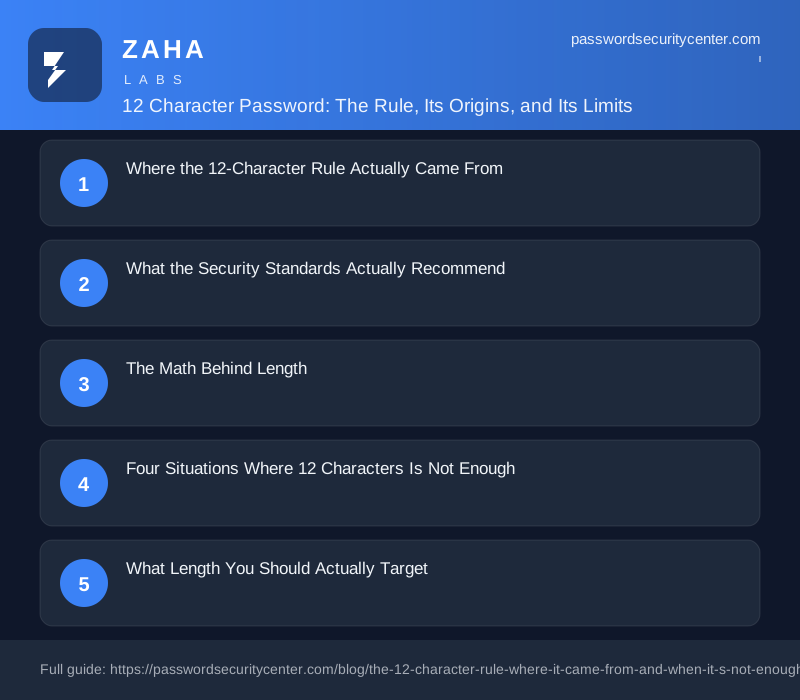
Where the 12-Character Rule Actually Came From
There is no single document where a standards body wrote "12 characters" as a requirement. The number evolved from a decade of tension between two competing approaches: complexity rules versus length.
Through much of the 2000s and early 2010s, enterprise security policy defaulted to a minimum of 8 characters paired with mandatory complexity: at least one uppercase letter, one digit, one special character. The rationale was that mixing character types would expand the theoretical search space enough to slow guessing attacks. The math was correct; the psychology was not.
Users responded to complexity rules with predictable workarounds. A common word with a capital letter at the start, a number near the end, and an exclamation mark at the finish became the dominant pattern: Password1!, Summer2019#, Company123$. These satisfy every complexity check and remain trivially crackable with pattern-aware dictionary attacks, because attackers have catalogued exactly how humans respond to complexity requirements.
Security researchers noticed the mismatch and began arguing for length over complexity. Longer passwords, even those drawn only from lowercase letters, represent far more combinations than short passwords with mixed characters, because length multiplies possibilities exponentially while expanding the character set multiplies them once. Adding a capital letter to an 8-character password uses a larger alphabet; adding a ninth character multiplies the entire search space by that alphabet's size.
As GPU-accelerated password cracking became accessible outside research labs, the community recalibrated. Eight characters felt too close to the reachable frontier. Twelve emerged as practical consensus: long enough to raise attack costs meaningfully, short enough to type without a manager. No committee voted on it. Security teams, frameworks like PCI-DSS, and enterprise IT policies each arrived at roughly the same number, and 12 crystallized as the informal industry floor.
What the Security Standards Actually Recommend
Once you examine formal guidance, the picture shifts upward from 12.
NIST SP 800-63B, the US federal Digital Identity Guidelines, substantially revised in 2017 and updated in 2024, sets the minimum at 8 characters for memorized secrets. That number is a compliance floor for any system, not a recommended target for individuals. NIST explicitly encourages organizations to support passwords up to 64 characters, dropped mandatory rotation and complexity rules entirely, and requires that any new password be checked against known-compromised values before acceptance.
NIST SP 800-63B now requires that compliant systems reject passwords found in breach databases, regardless of their length or complexity. A 20-character password that appeared in a previous breach should not be accepted. Length and uniqueness are separate requirements, and strong passwords need both.
CISA's "Use Strong Passwords" guidance recommends at least 16 characters as the target for strong passwords, naming length as the single most important factor in resisting brute-force attacks. Because CISA's public materials are aimed at everyday users, this is the clearest current guidance individuals can act on.
The UK National Cyber Security Centre (NCSC) recommends three random words, a passphrase approach that naturally produces passwords of 15 to 25 or more characters without requiring the memorization of random strings. The NCSC's rationale is that length and memorability reinforce each other, while complexity requirements push users toward predictable workarounds.
Twelve characters sits between NIST's minimum and the targets recommended by CISA and NCSC. Calling it a "rule" overstates its authority; it is a floor, not a finish line.
The Math Behind Length
Every character added to a password multiplies the total possible combinations by the size of the character set in use. With 94 printable ASCII characters, 26 lowercase, 26 uppercase, 10 digits, 32 common symbols, the search space grows dramatically with each addition:
| Length | Character set | Approximate combinations |
|---|---|---|
| 8 chars | 26 lowercase only | ~209 billion |
| 8 chars | 94 printable ASCII | ~6 quadrillion |
| 12 chars | 94 printable ASCII | ~476 sextillion |
| 16 chars | 94 printable ASCII | ~37 nonillion |
Moving from 8 to 12 characters while holding the character set constant multiplies the combinations by roughly 78 million. That is a genuine barrier against exhaustive brute-force attacks on the combinations themselves.
What limits this advantage is hashing speed. When a site stores your password by hashing it, an attacker who steals that database can test guesses at whatever rate their hardware allows. Fast algorithms like MD5 and SHA-1 permit testing at enormous speeds. Slow, deliberately expensive algorithms, bcrypt, scrypt, Argon2, reduce guessing rates by orders of magnitude. A 12-character password stored behind Argon2 is substantially safer than a 16-character password stored as unsalted MD5. You typically cannot find out which algorithm a given site uses.
Four Situations Where 12 Characters Is Not Enough
The password appeared in a previous breach
This is the most common single-point failure. If your exact password, regardless of length, was exposed in a prior data breach, attackers running credential stuffing can try it directly against other services without guessing anything. The attack succeeds on the first attempt.
The Have I Been Pwned Pwned Passwords database lets you check whether a specific password appears in known breach data. Any match is reason to change that password immediately. NIST 800-63B requires that compliant systems perform this check automatically at account creation, for sites that implement it correctly, a compromised password is rejected before it can cause harm.
The password follows a predictable human pattern
Pattern-aware attacks do not work through random combinations in sequence, they test what humans actually construct first. A password like Summertime23! is 13 characters, passes every complexity rule, and sits squarely inside the templates cracking tools model explicitly: common noun, season, year, special character at the end. Attackers who have studied large datasets of real-world passwords know that humans capitalize the first letter, append years, and close with punctuation.
A randomly generated 12-character password avoids these patterns. A human-invented one usually does not.
The password is reused across accounts
The Verizon Data Breach Investigations Report consistently identifies credential-based attacks as a leading cause of breaches year after year. Reuse is the mechanism that turns one compromise into many. A 12-character password shared across 30 sites means a breach at the weakest one, the obscure forum with outdated security practices, simultaneously exposes the other 29. No length compensates for reuse once a single site in the chain is compromised.
The site stores passwords with a weak algorithm
If a site uses a fast or outdated hashing algorithm, the length advantage narrows substantially when an attacker cracks their database. You have no way to fix this directly. The only practical mitigation is using a unique password for every account, so one site's poor storage practices cannot propagate elsewhere.
Some services have been found to store passwords in recoverable or weakly hashed forms that should not exist in 2025. The fact that a site uses HTTPS says nothing about what happens to your password once it arrives on their servers.
What Length You Should Actually Target
A randomly generated, unique 12-character password is acceptable for low-stakes accounts and exceeds most formal compliance requirements. For accounts that matter, email, banking, work systems, healthcare portals, 16 characters or more is the right target, in line with current CISA guidance.
The hierarchy from strongest to most practical:
- Passkeys, cryptographic authentication with no shared secret, phishing-resistant by design. The FIDO Alliance documents which services support them. Use wherever available.
- Password manager-generated random passwords, 16+ characters, unique per site, the practical gold standard for most accounts.
- Three genuinely random words, long, memorable, resistant to both brute-force and pattern attacks, consistent with NCSC guidance.
- Randomly generated 12-character password, unique per site, above formal minimums, acceptable for lower-stakes accounts.
A password manager generates a different random password for every site, stores them securely, and fills them in automatically. You remember one strong master password; the manager handles everything else. This single change removes the reuse failure mode and makes genuinely random passwords the default rather than the exception.
Any password approach works better alongside multi-factor authentication. An authenticator app running TOTP (RFC 6238) means an attacker who obtains your password still cannot log in without your physical device. Google's 2-Step Verification walks through the setup if you are new to authenticator apps.
What to Do Now
- Check your most-used passwords at Have I Been Pwned Pwned Passwords, change any that appear in the results today, not later.
- Enable MFA on email and banking before anything else; these two accounts can unlock everything else you own online.
- Install a password manager if you do not already use one, and let it generate a unique, random password for every site going forward.
- Upgrade short passwords first, prioritize anything under 12 characters, then work toward 16+ on high-value accounts.
- Stop reusing passwords, this matters more than the exact character count.
- Look for passkey support on sites you use most; where available, it removes the password problem entirely rather than working around it.
Frequently asked questions
Is a 12-character password good enough for everyday accounts?
A randomly generated, unique 12-character password exceeds formal minimums and is acceptable for lower-stakes accounts. For anything high-value, email, banking, work systems, 16 characters is a safer target, aligned with current CISA guidance. The 'random and unique' conditions matter as much as the character count.
Does adding special characters compensate for a shorter password?
Partially, but length wins the comparison. Going from 8 to 12 characters (same character set) multiplies combinations by roughly 78 million. Switching from lowercase-only to full 94-character ASCII at 8 characters multiplies them by about 29 million. Each extra character is more valuable than expanding the character set once.
What is credential stuffing and why does password length not stop it?
Credential stuffing means attackers take username-password pairs stolen from one breach and replay them against other services. If your exact password appears in a breach database, its length is irrelevant, the attacker tries it directly and succeeds immediately. Uniqueness per account is the only defense against this attack.
Are passkeys a full replacement for passwords?
Yes, where they are available. Passkeys use public-key cryptography stored on your device, eliminating shared secrets entirely. They are phishing-resistant and never appear in breach databases because they are never transmitted to a server in usable form. The FIDO Alliance maintains a list of services that currently support them.
Sources
- NIST SP 800-63B (Digital Identity Guidelines, authentication)
- CISA: Use strong passwords
- Have I Been Pwned: Pwned Passwords
Related reading
What to Do After a Data Breach: A Timed Response Checklist
Know what to do after a data breach with this timed response guide, first 15 minutes, first day, and first week actions to stop the damage spreading.

Password Policy Best Practices That Staff Will Actually Follow
The proven password policy best practices: mandate length, ban reuse, deploy a manager with SSO, and enforce phishing-resistant 2FA for admins.
Credential Stuffing: Why Password Reuse Is the Whole Attack
Credential stuffing uses breached passwords from one site to silently break into others. Learn exactly how the attack works and the concrete steps to